



Description
Download Rising PC Doctor – system optimization, PC security, malware protection, performance enhancement, system repair
Overview
Rising PC Doctor is a comprehensive system maintenance and security utility designed for Windows users seeking to enhance their PC's performance while protecting it from digital threats. The application addresses common challenges such as system slowdowns, memory bloat, and exposure to malware and spyware. By offering tools for process management, threat detection, and system repair, it enables users to maintain optimal functionality without requiring advanced technical knowledge. The app is particularly useful for individuals managing personal computers in home or small office environments who want to perform routine system checks efficiently.
Although the developer did not provide additional technical details about the origin or background of Rising, the application has been available since 2012, indicating a long-standing presence in the system optimization space. Its continued relevance suggests consistent updates and reliability over time. Real-world use cases include regular system cleanups, identifying resource-hogging processes, detecting malicious websites during browsing, and generating performance reports for troubleshooting. In the broader software ecosystem, Rising PC Doctor serves as a lightweight yet effective tool for users who prefer a focused approach to PC health rather than relying on full-featured antivirus suites.
Key Features & Functionality
- Running Processes Management: Allows users to monitor and terminate unnecessary background processes that consume CPU, memory, or disk resources. This feature is especially helpful during high-demand tasks like gaming or video editing, where system responsiveness is critical.
- Malware and Spyware Analysis: Conducts deep scans to detect potentially harmful software, helping users safeguard sensitive data and prevent unauthorized access to personal information.
- System Repair Utilities: Offers built-in tools to fix common system errors, registry issues, and corrupted files that may lead to crashes or instability.
- Dangerous Website Detector: Alerts users in real time when visiting websites flagged as unsafe, reducing the risk of drive-by downloads and phishing attacks.
- Comprehensive System Reports: Generates detailed summaries of system health, including disk usage, service status, and performance trends, enabling proactive maintenance.
Each feature is designed to simplify complex system tasks into actionable steps. For example, a user experiencing slow boot times can use the system repair tools to diagnose and resolve underlying issues. Similarly, someone noticing unexpected network activity can leverage the process manager to identify and stop suspicious programs. These capabilities collectively contribute to a more stable, secure, and efficient computing experience.
Interface, UX & Performance
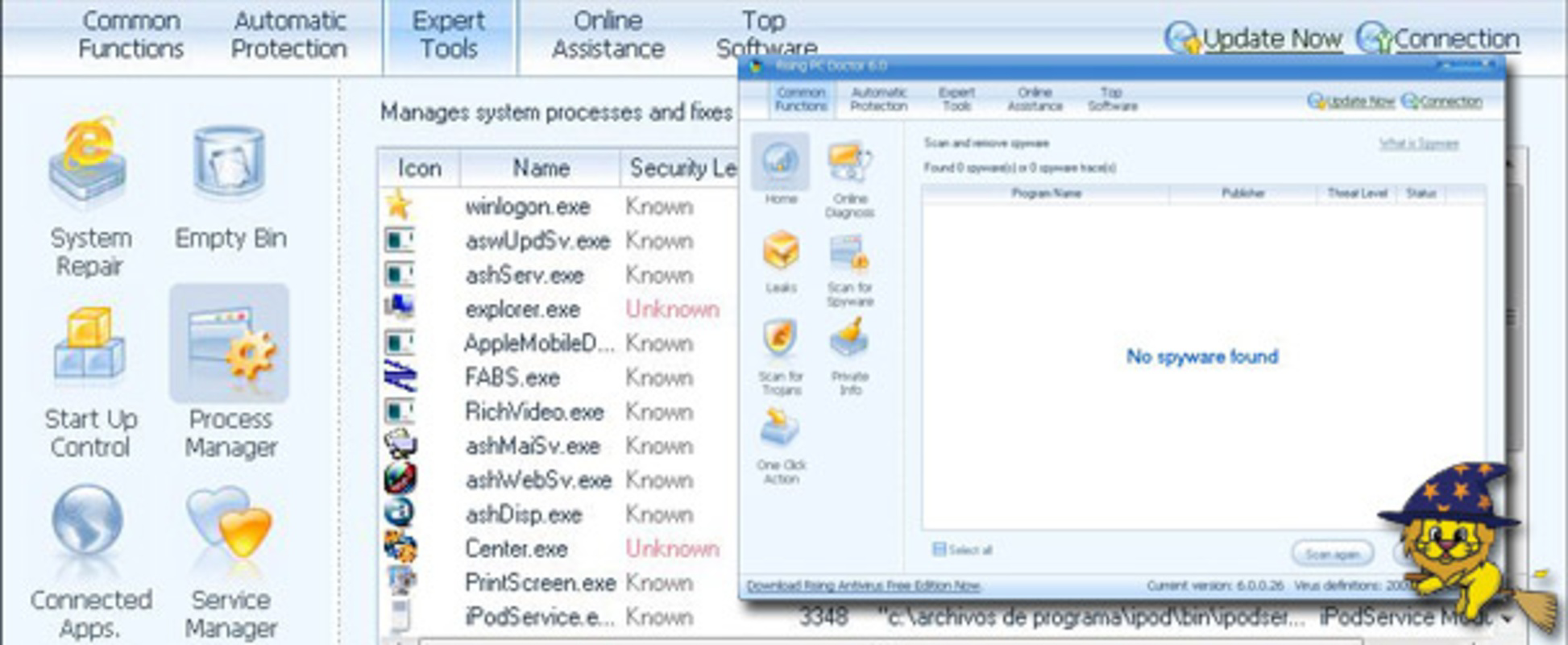
Rising PC Doctor features a clean, intuitive interface that prioritizes accessibility for non-technical users. The layout organizes core functions into clearly labeled sections, allowing users to navigate between tools with minimal effort. Visual design elements are straightforward, focusing on functionality over aesthetics, which aligns with its utility-driven purpose. Navigation is linear and predictable, reducing the learning curve for first-time users.
Although the developer did not list formal performance metrics, the application’s lightweight footprint of 12.8 MB suggests efficient resource usage. It is expected to operate smoothly on a wide range of Windows systems, including older hardware. Responsiveness appears consistent across tasks such as scanning, reporting, and process management. Stability is likely maintained through regular updates to its online database, which supports real-time threat intelligence. Users can expect reliable operation during routine maintenance without significant impact on system performance.
Platform Compatibility & Technical Requirements
Rising PC Doctor is available exclusively for the Windows platform. The current version is 2.0.1.0, with a file size of 12.8 MB. The application is distributed as a free tool, making it accessible to a broad audience. The developer did not specify minimum OS requirements, nor did they list compatibility details for specific Windows versions such as Windows 7, 8, or 10. As such, users should exercise caution when installing on systems with outdated or unsupported operating systems.
Given the app’s release date of 2012, it is possible that newer Windows versions may require compatibility mode or additional configuration. However, the lightweight nature of the application increases the likelihood of successful execution across multiple Windows environments. Users are advised to verify system compatibility before installation, especially on modern systems where security policies may restrict legacy software.
Pros and Cons
Pros
- Free to download and use, offering valuable system tools at no cost.
- Lightweight design with minimal system resource consumption.
- User-friendly interface suitable for non-technical users.
- Offers a range of practical utilities for performance and security.
- Regular updates via online database ensure ongoing threat detection.
Cons
- Developer did not provide detailed compatibility information for Windows versions.
- Release date is from 2012, raising concerns about long-term support and modern security standards.
- No visible in-app update notifications or automatic update mechanism.
- Limited transparency regarding data collection or privacy practices.
- May not be fully optimized for newer Windows 11 environments without testing.
FAQ
Is Rising PC Doctor safe to install on my Windows PC?
Yes, the application is designed to enhance system security and performance. However, users should ensure they download it from official or trusted sources to avoid tampered versions.
Can I use Rising PC Doctor on Windows 10 or Windows 11?
While the developer did not specify compatibility details, the lightweight nature of the app increases the likelihood of compatibility. Testing in compatibility mode may be necessary on newer systems.
Does Rising PC Doctor require an internet connection?
Yes, the application relies on an online database for malware and website threat updates, so an active internet connection is required for full functionality.
How often should I run a system scan?
It is recommended to perform a full system scan at least once a week, especially after downloading new software or visiting unfamiliar websites.
Is Rising PC Doctor a replacement for antivirus software?
No, it is not intended to replace dedicated antivirus programs. Instead, it complements existing security tools by focusing on system optimization and threat detection.
Final Thoughts
Rising PC Doctor remains a practical choice for users seeking a lightweight, free tool to manage system performance and security. Its blend of process monitoring, malware analysis, and repair utilities offers tangible benefits for everyday computing. While its age raises questions about modern compatibility, its core functionality continues to serve users who value simplicity and efficiency. For individuals managing older systems or looking for supplemental maintenance tools, it provides a reliable solution without financial cost. The app’s focus on usability and practicality makes it a worthwhile addition to a PC maintenance toolkit.
Download Rising PC Doctor now
Guides & Tutorials for Rising PC Doctor
How to install Rising PC Doctor
- Click the Preview / Download button above.
- Once redirected, accept the terms and click Install.
- Wait for the Rising PC Doctor download to finish on your device.
How to use Rising PC Doctor
This software is primarily used for its core features described above. Open the app after installation to explore its capabilities.
User Reviews for Rising PC Doctor 0
No reviews found


